
With OSInet having a large part of its business with suppliers and customers within the EU at large, I often find myself having to check the validity of the VAT information for third parties, and the EU VIES database comes in handy.
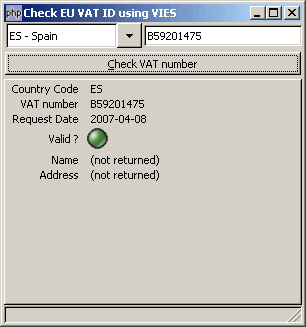 However,
although I had been discussing remote access
using XML-RPC or SOAP as early at 2004 with the database
administrators, the UI had remained web 1.0-only until quite
recently (apparently march 2007), when an
AXIS
SOAP service went online, just as I had suggested three years
ago. So I figured I really couldn't let the occasion pass, and did a
PHP-GTK client to VIES, which happens to be my first production
SOAP application in PHP-GTK, previous ones having always been
done in Pascal using Delphi or Kylix.
However,
although I had been discussing remote access
using XML-RPC or SOAP as early at 2004 with the database
administrators, the UI had remained web 1.0-only until quite
recently (apparently march 2007), when an
AXIS
SOAP service went online, just as I had suggested three years
ago. So I figured I really couldn't let the occasion pass, and did a
PHP-GTK client to VIES, which happens to be my first production
SOAP application in PHP-GTK, previous ones having always been
done in Pascal using Delphi or Kylix.
Let's see how this can be done... (code updated 2010-09-21)
UI layout
OK, you have already noticed I'm not much of a designer, so the
UI is rather minimal on eye-candy, but it gets the job done. The
structure is simple: within the main GtkWindow,
a GtkVBox delimits four areas, from top to
bottom:
- a
GtkHBoxfor the input values, containing itself aGtkComboBoxfor the country codes, and aGtkEntryto key in the VAT ID to be tested. - a
GtkButtonto fire the SOAP call - a work area (more about it later)
- a
GtkStatusBarfor miscellaneous information
Within the work area, two types of content can be displayed: either informational messages, to appear on application startup and when the VIES server returns an exception, or actual results from the VIES server, properly structured.
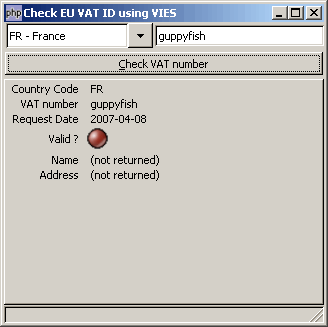 The first type
of content is best served by a simple memo, which
in PHPGTK2 is created as a
The first type
of content is best served by a simple memo, which
in PHPGTK2 is created as a GtkTextView, while a
tabular layout renders structured results more nicely, especially
when a visual cue like a Red/Green indicator is simple to add,
thanks to the stock image support added in PHP-GTK 2.
So how does one toggled from one content type to the next:
simply enough, using a GtkNotebook with hidden
tabs.
You can check the Glade used for the UI in the download attached to this post.
Installing SOAP
Unlike XML-RPC, which needed Zend Framework to eventually become really convenient to use with PHP-GTK, SOAP is very usable from the basic PHP distribution. The only problem is that, for now, the SOAP extension is not bundled with Gnope, the most popular PHP-GTK distribution.
If your distribution does not have the SOAP extension, this is
simple to fix: just download it from the PHP archives to obtain a version of PHP matching the version of PHP used in your PHP-GTK distribution, copy the
php_soap.dll to <php-gtk dir>/ext,
add a line for the extension to your php.ini, and
you're done.
Using SOAP
Using PHP SOAP with a supplied WSDL schema is even simpler than installing it, and luckily, the EU supplies their WSDL schema online at http://ec.europa.eu/taxation_customs/vies/api/checkVatPort?wsdl.
All it take is three lines of code:
The first line creates the SOAP client in WSDL mode, which fetches the WSDL schema for the service from the passed-in URL, while the second line builds the object parameter expected by the VIES service, and the third line invokes the remote procedure and returns its result.
This needs some polishing, though: as with any distributed operation, this can fail and cause exceptions, so here is a more refined implementation of the client:
In case you wonder about the constants in the
$faults array, these are documented in the VIES
WSDL schema. The only slightly weird part in all this is the fact
that VIES returns errors as a full line of text about a Java
exception, which needs to be reduced to the constant specified
in the WSDL schema, thanks to the small regexp.
Wrapping it up
All that remains is to wrap the SOAP call in the PHP-GTK UI, and, as usual with Glade UIs, we'll just create a UI class definition, to gather the event callbacks and the basic functions needed for the UI. First, our constructor:
This just loads the Glade file discussed previously, and connects the callbacks as defined within the Glade file to the class instance. Some basic methods are useful too:
This will allows the application body to be reduced to :
The only important remaining part is the callback for the UI button invoking the SOAP service:
Nothing much yet: we fetch widgets from the Glade file, and set or extract their values. Now, if we have a valid country code and something in the VAT field, we can prepare to submit, so we start by switching the UI to the message page, and setting a wait message in the status bar, after what we can start the long-running SOAP call:
yield() is just a shortcut to the canonical PHP-GTK
code to process events and allow the UI to refresh:
At this point, we have a return from SOAP, which can either be an error message, or the object documented in the WSDL schema, so we can just check on the return type, and either set the text of the message in the main area, or set widget values on the structured answer page:
A specific case is the GtkImage widget set using
a stock image:
And finally, still some more widgets, not forgetting that in most countries, the national VAT database does not return the name or address bound to a VAT number:
We've been doing this hidden, since the displayed page is still the message page, so now that everything is in order, we can switch to the structured answer page:
And it's over ! You can give it a spin by downloading the full
project. The checkVatPort.xml file is a cached copy
of the WSDL schema to avoid overloading the EU site with requests
while you are testing.
The code is provided under the (Open Source / Free Software) CeCILL 2.0 license.
PHP-GTK SOAP
WSDL has been changed
For some unknown reason, the WSDL has been changed to 'http://ec.europa.eu/taxation_customs/vies/checkVatService.wsdl'
Updated VIES client version
Thanks for the heads up about the URL change.
I've taken advantage of the occasion to update the code somehow. The attached version in the article is now more recent.
New repo for VIES client
http://code.osinet.fr/fgm/php__gtk_vies
Issues and pull requests welcome.