
2009-05-24: UPDATE: now ported to D6
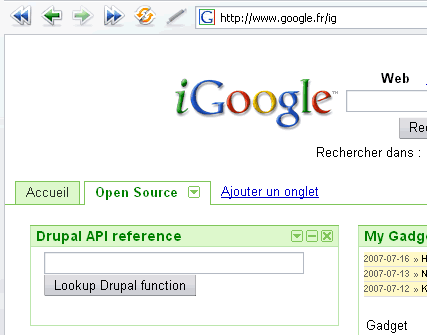 Having recently discovered the Google Gadgets API, and being on vacation this week proved too much of a temptation: I had to build one using Drupal. Here is a way to do it, as a module creating a Google Gadget to directly search http://api.drupal.com/ from the iGoogle home page. User preferences allow searching the various versions of the API and default to Drupal 5.
What's in a gadget module, anyway ?
Google gadgets are (typically) small XML documents, which can be either envelopes (metadata) pointing to externally defined "modules" (not to be confused with drupal modules), or fat objects containing the "module" as a CDATA section within the envelope itself.
For this smallish example, I chose the second option, which tends to make things more compact. For a more general gadget creation API within drupal and a set of gadgets such as a popular site might wish to create, it would probably be better to serve envelopes and data separately, using the <content type="url"></content> mechanism in Google Gadgets.
Design choices: PHP5 + DOM
With Drupal plowing full speed ahead to PHP5.2 only, it obviously only made sense to use PHP5 features, but the steps to take to downgrade to PHP4 are still fairly obvious.
In this case this means that we'll be defining a GoogleGadget class to hold our actual working methods, and only use PHP4 traditional functions to hook into Drupal.
Code, code, code
I don't think this needs commenting, but it had to be there.
Our class will be holding the data in Drupal-traditional fashion: arrays within arrays, and '#' prefixed for child elements. So what does such a class need to hold ?
- a content type definition: gadgets are in HTMl by default, but can contain other content types, so this has to be declared
- content: what good would it be without it ?
- module-level preferences: for global preferences which gadget users won't be allowed to change
- user-level preferences: for those which the iGoogle UI will allow users to change
contentType * @var string */ public $content = ''; /** * Hold elements (#-prefixed) and attributes below ModulePrefs * * @var array */ public $modulePrefs; /** * Hold attributes for UserPref elements * * @var array */ public $userPrefs; ?>
In the class constructor, we just set up the defaults and initialize arrays. This avoids warnings under E_STRICT | E_ALL when adding elements to them later on.
contentType = $type; $this->content = $body; $this->modulePrefs = array(); $this->userPrefs = array(); } ?>
Then we define our FAPI-like array for module preferences.
modulePrefs["#$section"][$name] = $value; } ?>
And the vector of user preferences.
userPrefs[$name] = $attributes; $this->userPrefs[$name]['name'] = $name; $this->userPrefs[$name]['display_name'] = $displayName; } ?>
<Rant> why did they use two different structures ? module preferences are stored as elements under child elements of Moduleprefs while user preferences are stored as such child elements themselves.</Rant>
Actual rendering
Since we're using a module and not a theme, we must return a full page, which means echoing to output and using die(), instead of returning the result of the module rendering.
This function is the main point of change if one wants to use separate envelopes and content: as such, it outputs both in one pass.
createElement('Module'); $module = $doc->appendChild($module); ?>
Yay, XML DOM. Much cleaner and actually simpler than hand-generating the XML by appending/prepending strings here and there. So here we create the module preferences part:
modulePrefs) > 0) { $prefsNode = $doc->createElement('ModulePrefs'); $prefsNode = $module->appendChild($prefsNode); $sections = array(); foreach ($this->modulePrefs as $prefName => $prefValue) { if ($prefName[0] == '#') { $prefName = substr($prefName, 1); if (!in_array($prefName, $sections)) // must create it { ${$prefName} = $doc->createElement($prefName); ${$prefName} = $prefsNode->appendChild(${$prefName}); $sections[] = $prefName; } foreach ($prefValue as $attrName => $attrValue) { ${$prefName}->setAttribute($attrName, $attrValue); } } else { $prefsNode->setAttribute($prefName, $prefValue); } } } // module preferences ?>
Then the user preferences part:
userPrefs > 0)) { foreach ($this->userPrefs as $prefArray) { $prefNode = $doc->createElement('UserPref'); $prefNode = $module->appendChild($prefNode); foreach ($prefArray as $prefName => $prefValue) { $prefNode->setAttribute($prefName, $prefValue); } } } ?>
At this point, the envelope ends, and we add the content, since we are doing the fat format with content within the envelope.
createElement('Content'); $content = $module->appendChild($content); $content->setAttribute('type', $this->contentType); $data = $doc->createCDATASection($this->content); $data = $content->appendChild($data); ?>
Noticed the CDATA section ? Ain't it nicer than hand-inputting the actual CDATA syntax ?
And now, of course, we output our DOM as an XML string.
saveXML(); die(); } } // end of class ?>
Hooking with drupal
Not much to see here: just a minimal hook_menu implementation. The menu item is only there since this is a demo. You'd probably want to use a MENU_CALLBACK instead of the default MENU_NORMAL_ITEM.
'gadget', 'title' => t('Google Gadget sample'), 'access' => TRUE, 'callback' => 'gadget_main', ); } return $items; } ?>
And, of course, any menu callback needs to be defined, so here is the gadget_main callback we just hook_menu'ed.
EOT ); ?>
heredoc syntax is convenient for such an example, but a production-leve example would obviously use something else here to pass to the GoogleGadget constructor.
Google APIs
Now, look at the contents of the CDATA section above: the __UP_ string is substituted on the fly by Google with the user preferences; and the final _IG_AdjustIFrameHeight(); call will allow the iGoogle page to use a Javascript resizing to fit the gadget's height to its contents.
Note that this depends on having the dynamic-height being set up as a module preference, which is done in the "Finishing up" section below.
Finishing up
Now we set up a few properties:
contentType = 'html'; // default value, just added here to show it exists $g->modulePrefs['title'] = 'Drupal API reference'; $g->modulePrefs['author'] = 'Frederic G. MARAND'; $g->modulePrefs['description'] = 'A simple module to demonstrate how to build google gadgets within Drupal'; $g->modulePrefs['author_email'] = 'http://blog.riff.org/contact'; $g->modulePrefs['author_link'] = 'http://blog.riff.org/'; $g->setModulePref('Require', 'feature', 'dynamic-height'); $g->addUserPref('apiversion', 'Drupal API version', array ( 'default_value' => '5' )); $g->render(); // includes die() to avoid drupal themeing } ?>
...and finish by invoking the object's render method. That's all there is to it !
Discussion
For production-level situations using such gadgets, I think it would be better to combine several strategies:
- separate envelope and content: envelopes can typically be static, even when the content is dynamic, hence totally cached, with no load on drupal itself, of served
- use a similar module to handle the attribute and content preparation and rendering, but...
- actually render using a theme: this is cleaner within the drupal architecture, where every output is supposed to come from a theme, and actually allows pages to end normally, with all necessary closure actions, which is not the case when terminating with a
die()as is done here.
As an exercice left to the reader: make the standard drupal autocomplete work in the gadgets.
check out the mysite module
You should check out the mysite module, it has this functionality built into it as well. Think of if as a mash-up for your drupal install and things like google gadgets.
mysite more like iGoogle / Netvibes
Hi Xamox, thanks for the reference. I had already seen mentions of that module but hadn't checked what it did.
Reading the description of mysite.module, though, it seems it is more designed as a portlet container like the iGoogle or netvibes pages than as a module to generated Google Gadgets for use with iGoogle itself, as in the example is described.
MySite
[I'm the MySite maintener]
Correct. MySite can _use_ Google Gadgets, but it does not create them.
However, we could merge this code approach into the module and allow MySite content elements to be _exported_ to Google Gadgets.
I'm toying with ways to make MySite's content elements accessible as JavaScript, so that users could add content to their sites as well.
The Google Gadget method would be similar. See a related discussion at http://drupal.org/node/140151.
rendering
Easy to make third-party gadgets directory with Drupal
Gallery of Drupal-based Google Gadgets
Indeed, this has been discussed with others who also created gadgets with this module: such "meta"-modules are mostly useful when "application" modules start being created and listed somewhere
All that's needed is someone interested in so doing. Maybe you ?